
Manga & webtoons · Screen and web translation
How do I read raw manga and webtoons on iPhone in my language?
Loupe gives you two ways to read manga on iPhone. In any comic app, Live mode shows the speech bubbles near its window translated in place. For comics on the web, open them in Loupe’s web mode and whole pages are translated bubble by bubble as you scroll. Both are free to try every day; Loupe Pro removes the limits.
Download on the App StoreFree every day. No account needed.
How do I translate manga with Loupe, step by step?
Loupe translates manga in a comic app with Live mode, and comics on the web with web mode or the Safari extension; follow the steps for where you read.
Download the comic’s language once.
Download the language pack for Japanese, Korean or Chinese to your language (Loupe shows the size and asks first).
In a comic app: start Loupe.
Tap Start Loupe, then Start Sharing, and open your comic app. Put the window right below the panel you’re reading; Near the window reads the text just above it, or choose Whole screen.
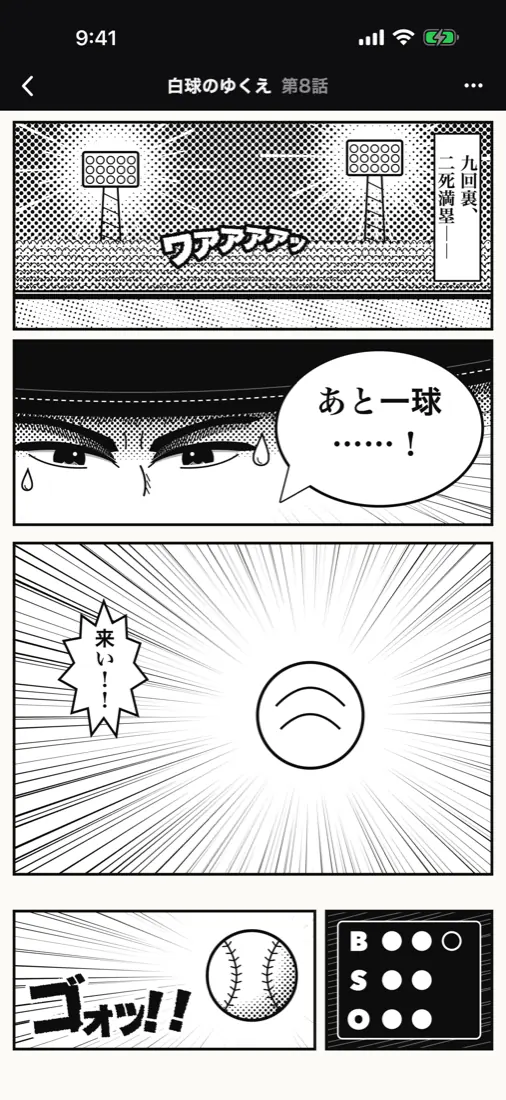
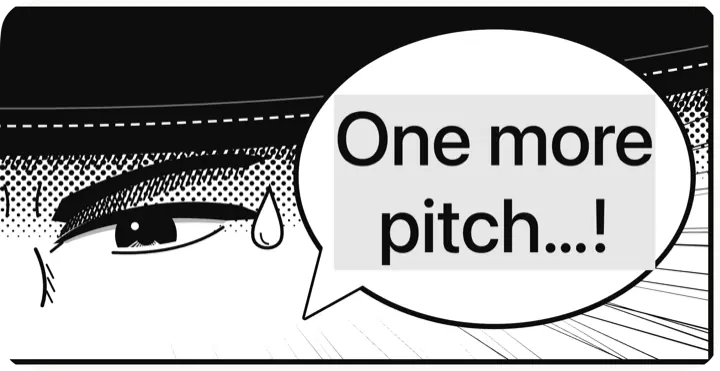
The bubble in the comic app, and the same panel in Loupe’s window, translated. On the web: use web mode.
Open the comic’s page in Loupe’s web mode, or pick an official, licensed site from the start page. Pages are translated as you scroll: text goes back into the bubbles, vertical text and lines split across image seams are handled, and sound effects too. Press and hold to see the original.
Or stay in Safari.
Turn on the Loupe Safari extension and switch on Images for the site. Pictures with text get a badge, speech bubbles are redrawn in your language, and tapping the badge shows the original.
Adjust how you read.
With Loupe Pro, Subtitle mode lists the translated lines as numbered, large-type cards, with a right-to-left reading order for manga. With an AI model you can add a story background and a glossary so names stay consistent.
Which comics can Loupe translate?
Loupe translates manga, manhwa and webtoons in comic apps that allow screen sharing, and comics on web pages in its web mode or in Safari. Web mode handles the hardest parts of comic pages.
- Raw manga and manhwa in comic apps that don’t offer your language.
- Webtoons and web comics: web mode translates whole pages, bubble by bubble, as you scroll.
- Vertical Japanese text and dialogue split across the seam between two images, in web mode.
What can’t Loupe do with manga?
Loupe can’t read comic apps that block screen recording, and it doesn’t host or download comics. Keep these limits in mind.
- Comic apps that block screen recording appear black to Loupe; for those, try the same comic on the web in web mode if it’s available there.
- Loupe is a translator and browser, not a comic store. The start page lists official, licensed sites.
- On the free plan, web mode and the Safari extension share 10 pages a day, and Live mode shares 5 minutes a day with Voice captions.
How natural are Loupe’s manga translations?
By default, Loupe recognizes and translates text on your iPhone or iPad: it’s fast, private and free, but on-device translation can sound stiff and miss context such as names.
For more natural results, Loupe Pro includes Loupe AI (off until you read a short notice and agree), or you can connect an AI model or translation service with your own key.
When you connect your own service, preset services need Pro, and the free plan can add one custom endpoint. With an AI model, recent lines are sent along so names and tone stay consistent.
Which comic languages can Loupe translate?
Loupe translates the languages supported by Apple’s on-device translation, including Japanese, Korean, Chinese, English, Spanish, French, German, Thai and Vietnamese. It detects the language on screen automatically.
Each language pack comes from Apple (about 140–440 MB; Japanese to English is about 200 MB). Loupe shows the size and asks before downloading, and once a pack is downloaded, translation works offline. The app itself is available in 14 languages.
Is Loupe free for reading manga?
Loupe is free to use every day with daily limits, and it needs no account. The free plan includes 5 minutes a day of Live screen translation and Voice captions combined, Flash 5 times a day, and 10 pages a day across web mode and the Safari extension; the limits reset at midnight local time.
Translating a selection with Loupe as your default translation app is unlimited, even on the free plan.
Loupe Pro removes the daily limits and adds Loupe AI (online translation with a monthly allowance), Subtitle mode and more services you can connect.
In the US, Loupe Pro costs $1.99 a month, $9.99 a year or $19.99 once (Lifetime). Prices vary by region, so go by what the App Store shows you; subscriptions renew until canceled.
Common questions
Can I translate manga in other apps on iPhone?
Yes: Loupe’s Live mode reads the screen of whichever app is open, including comic apps, and shows the bubbles translated in a Picture in Picture window. Apps that block screen recording can’t be read.
How do I translate a webtoon page by page?
Open it in Loupe’s web mode. Whole pages are translated as you scroll, speech bubble by speech bubble, including lines that cross the seam between two images. Press and hold the page to see the original.
Does it handle vertical Japanese text?
Yes, in web mode: vertical text in speech bubbles is recognized and translated.
Can I translate manga images in Safari?
Yes: With the Loupe Safari extension, turn on Images for a site: speech bubbles are redrawn in your language, and you tap the badge to see the original. Free: 10 pages a day, shared with web mode.
Are the comic pages uploaded?
Not by default: recognition and translation run on your device. If you circle an area in web mode that your device can’t read, Loupe can send just that small area to the service you chose, and asks first for a service you connected yourself.
Last updated 2026-11-21