
Games · Live screen translation
How do I translate a game on iPhone while I play?
To translate a game on iPhone, use Loupe’s Live mode: start Loupe, confirm screen sharing, then switch to the game. A small Picture in Picture window shows the dialogue translated in place, so you keep playing. It’s free for 5 minutes a day; Loupe Pro ($1.99 a month in the US) removes the limit.
Download on the App StoreFree every day. No account needed.
How do I set up Loupe to translate a game?
Setting up Loupe for a game takes one language download and about a minute: choose what Loupe reads, start screen sharing, and go back to the game.
Download the game’s language once.
Open Loupe, choose the language you read, and download the language pack for the game’s language (for example Japanese to English, about 200 MB). Loupe shows the size and asks first; Wi‑Fi is recommended.
Choose what Loupe reads.
Pick a reading scope: Fixed area for a dialogue box that always sits in the same place (you frame it before you start, and the window stays outside it), Near the window for the text right above the window, or Whole screen. There are templates for portrait and landscape games.
Start Loupe.
Tap Start Loupe, choose Loupe in the system Screen Sharing panel and tap Start Sharing.
Switch to the game.
The Picture in Picture window shows the game’s text translated in its original layout. Each new line appears translated a moment after the game shows it, because Loupe reads the text first.
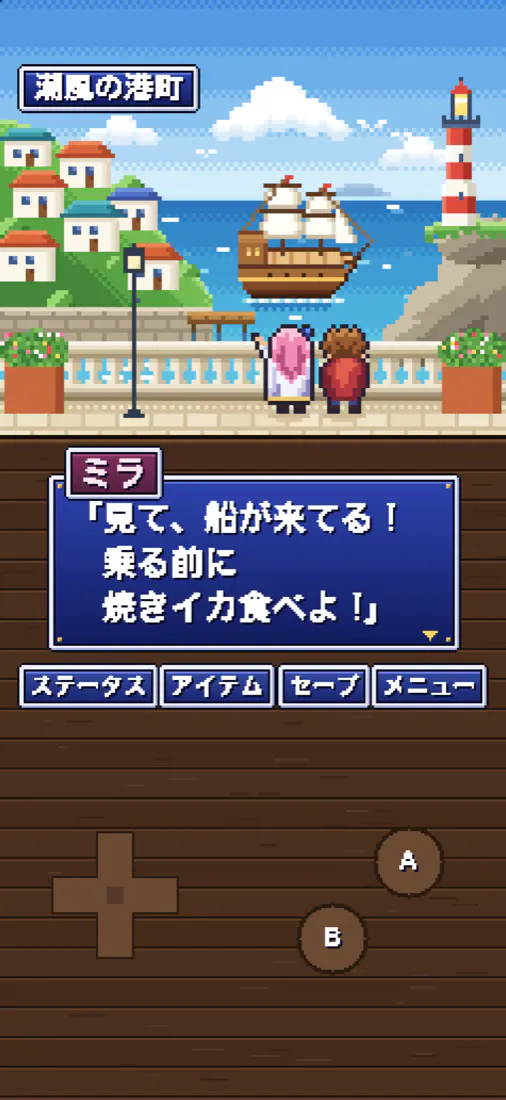

Left: the game. Right: Loupe’s window with the same dialogue box, translated. Stop when you’re done.
Return to Loupe and tap Stop Loupe, or close the window. Free time only counts while Loupe is actually translating.
Which games can Loupe translate?
Loupe can translate any game whose screen iOS lets it share, in the languages Apple’s on-device translation supports. It suits games with a lot of text that isn’t available in your language.
- Story-heavy mobile games, RPGs and visual novels from Japanese, Korean or other servers that have no translation.
- Menus, quests and item descriptions you want to understand without leaving the game.
- Games with a fixed dialogue box: Fixed area keeps the window off the part you’re reading.
- One-off screens: if you only need the current screen once, Flash translates the whole screen with one press of the Action button.
Why can’t Loupe translate some games?
Loupe can’t translate a game that blocks screen recording, because iOS hides that game’s picture from all screen sharing and Loupe sees a black screen. A few other limits are worth knowing before you start.
- Remote-play and cloud-gaming apps only work if they allow screen sharing; we haven’t tested them all.
- Translation appears a moment after the text, so lines that flash by very quickly can be gone before you read them.
- If Loupe picks the wrong source language (for example Japanese written only in kanji), tap the language chip and choose it yourself.
- The free plan’s 5 minutes a day are shared with Voice captions; long play sessions need Loupe Pro.
- Loupe requires iOS 26 or iPadOS 26 or later.
How good is Loupe’s translation of game dialogue?
By default, Loupe recognizes and translates text on your iPhone or iPad: it’s fast, private and free, but on-device translation can sound stiff and miss context such as names.
For more natural results, Loupe Pro includes Loupe AI (off until you read a short notice and agree), or you can connect an AI model or translation service with your own key.
When you connect your own service, preset services need Pro, and the free plan can add one custom endpoint. With an AI model, recent lines are sent along so names and tone stay consistent.
Which game languages can Loupe translate?
Loupe translates the languages supported by Apple’s on-device translation, including Japanese, Korean, Chinese, English, Spanish, French, German, Thai and Vietnamese. It detects the language on screen automatically.
Each language pack comes from Apple (about 140–440 MB; Japanese to English is about 200 MB). Loupe shows the size and asks before downloading, and once a pack is downloaded, translation works offline. The app itself is available in 14 languages.
Is Loupe free for translating games?
Loupe is free to use every day with daily limits, and it needs no account. The free plan includes 5 minutes a day of Live screen translation and Voice captions combined, Flash 5 times a day, and 10 pages a day across web mode and the Safari extension; the limits reset at midnight local time.
Translating a selection with Loupe as your default translation app is unlimited, even on the free plan.
Loupe Pro removes the daily limits and adds Loupe AI (online translation with a monthly allowance), Subtitle mode and more services you can connect.
In the US, Loupe Pro costs $1.99 a month, $9.99 a year or $19.99 once (Lifetime). Prices vary by region, so go by what the App Store shows you; subscriptions renew until canceled.
Common questions
How do I translate a Japanese game on iPhone?
Download the Japanese language pack in Loupe, tap Start Loupe and confirm screen sharing, then go back to the game. Loupe’s Picture in Picture window shows the Japanese dialogue translated in place; for a dialogue box that stays in one place, choose Fixed area.
Can I translate a Japanese or Korean game on iPhone without switching apps?
Yes: Loupe keeps a small Picture in Picture window on top of the game and translates its text in place as you play. You only go back to Loupe to start or stop.
Does Loupe work with landscape games?
Yes: Landscape games work on iPhone too, and the reading-scope screen has templates for landscape and portrait games. Fixed area lets you frame just the dialogue box.
Can I play on iPad and read the translation next to the game?
Yes: With Stage Manager or windowed apps, put the Loupe window beside the game: it shows the same screen with the text translated. When the game goes full screen, Loupe continues in a Picture in Picture window.
Why is the window black or empty?
The window is black when the game blocks screen recording, because iOS then hides its picture from screen sharing and Loupe can’t read it. If the window is empty instead, check that the language pack for the game’s language has finished downloading.
Does it work offline?
Yes: Loupe translates games offline once the language pack is downloaded, because on-device recognition and translation work without a connection.
Is my game screen uploaded?
No, not by default: Loupe recognizes and translates on your device, and screen images are never sent to us or saved as screenshots or recordings. Only a service you choose to connect, or Loupe AI once you turn it on, receives the text or audio it translates.
Last updated 2026-11-21