
Restaurants · AI Menu
How do I translate a restaurant menu on iPhone and order from it?
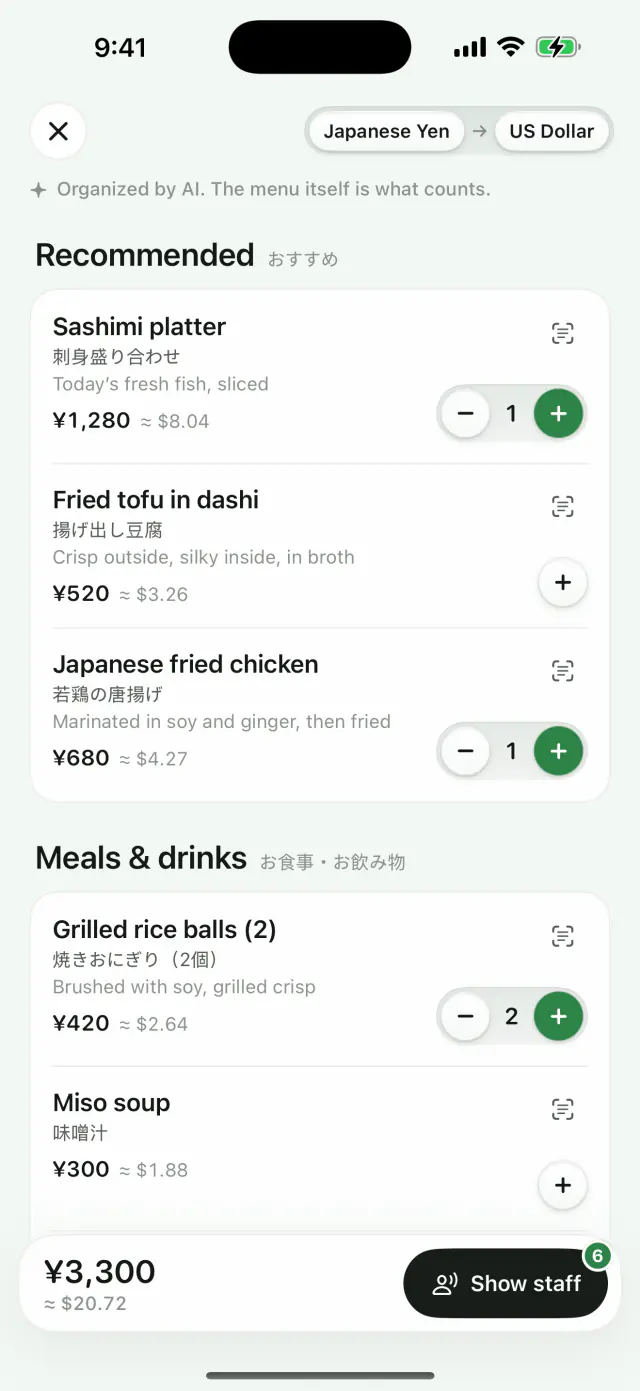
To translate a menu with Loupe, take a photo of it or pick one from Photos, and the text is translated in place. To order, tap “A menu? Turn it into an order list”: AI Menu lists each dish with its translated name, original name, a short note and an approximate price in your currency, then makes an order card in the menu’s language to show the staff. AI Menu needs Loupe AI (Pro) or an AI model you connect.
Download on the App StoreFree every day. No account needed.
How do I use AI Menu, step by step?
AI Menu starts from an ordinary photo translation and takes four steps from the photo to an order card.
Take or pick a photo of the menu.
In Loupe, take a photo of the menu or pick one from Photos; you can also share a photo or screenshot to Translate with Loupe. The menu comes back translated in place first.
Tap “A menu? Turn it into an order list”.
The button is at the bottom of the result; if it doesn’t appear, tap More and choose Organize as a menu. Nothing is sent until you tap, and the photo is sent only after you agree.
Pick your dishes.
Each dish shows its translated name, its original name and a short note, with the price converted to your currency at a reference rate (shown as approximate). Tap + to add a dish and set the quantity.
Show the staff.
Tap Show staff for an order card written in the menu’s own language, ready to hand over.
What do I need to use AI Menu?
AI Menu needs Loupe AI, which comes with Loupe Pro, or another AI model you connect with your own key. On-device translation still translates the menu photo in place, but it can’t organize the menu into an order list.
Can AI Menu read handwritten or vertical menus?
AI Menu is made for menus that are hard to read, including handwritten and vertical ones. The list is organized by AI, so check dishes and prices against the printed menu; the menu itself is what counts.
How accurate are the prices in AI Menu?
AI Menu shows each price as printed and converts it to your currency at a reference rate, so the converted amount is an estimate. What you pay is the price on the menu, in its own currency.
Is my menu photo sent anywhere?
Your menu photo leaves the device only when you tap to organize it and agree. With Loupe AI, it’s relayed through our server to a model provider; with an AI model you connected yourself, it goes straight from your device to that provider.
The photo, its translation, the organized menu and your order are kept in Image History on your device only, up to the latest 30, and you can turn that off or clear it.
Which menus can Loupe translate without AI Menu?
Loupe can translate any menu photo in place without AI Menu, using on-device translation, in the languages Apple’s on-device translation supports. That shows what each line says, but without the dish notes, converted prices or order card.
Is AI Menu free?
AI Menu works with Loupe AI, which is part of Loupe Pro, or with an AI model you connect with your own key. Translating the photo in place counts toward Flash, free 5 times a day.
Loupe Pro removes the daily limits and adds Loupe AI (online translation with a monthly allowance), Subtitle mode and more services you can connect.
In the US, Loupe Pro costs $1.99 a month, $9.99 a year or $19.99 once (Lifetime). Prices vary by region, so go by what the App Store shows you; subscriptions renew until canceled.
Common questions
Can Loupe translate a restaurant menu?
Yes: Take a photo of the menu or pick one from Photos and Loupe translates it in place. With AI Menu, it also turns the menu into a list you can order from, with prices in your currency and an order card for the staff.
Does AI Menu work without Loupe AI?
Yes, if you connect another AI model with your own key in Settings › Translation Engine. With on-device translation only, the menu is translated in place but can’t be organized into an order list.
Can I show the staff what I want to order?
Yes: After you add dishes, tap Show staff: Loupe shows an order card in the menu’s own language with the dishes and quantities you chose.
Does AI Menu work offline?
No: Organizing a menu needs a connection to Loupe AI or the AI model you connected. Translating the menu photo in place works offline once the language pack is downloaded.
Last updated 2026-11-21