Translate what you see and hear.
Loupe is a screen translator for iPhone and iPad: any app’s text translated in place, live captions for videos and speech, web pages and comics too.
Free every day. No account needed.


Works in any app: translated live, right where the words are.Press the Action button once. The whole screen comes back translated in place.Also works with Back Tap or from Control Center.Sound on your phone, captioned as it’s spoken, with a transcript you can revisit in the app.
- 日本語
- English
- 한국어
- Español
- 简体中文
- Français
- ไทย
- Deutsch
- 繁體中文
- Tiếng Việt
- Italiano
- العربية
- Português
- Bahasa Indonesia
- Русский
- हिन्दी
- Nederlands
- Türkçe
- Polski
- Українська
Works in any app.
Game dialogue, menus, the news. Keep reading right where you are.


 海老天丼
 海鮮丼
 抹茶と季節の和菓子
Speech you hear, in captions you can read.
Sound playing on your phone or people talking around you, translated as they speak.
Phone Audio
Foreign videos, live streams and online classes get bilingual captions in Picture in Picture that stay with you across apps.
Nearby Speech
Meetings, classes and face-to-face talks: the microphone listens and big bilingual captions follow. Tap Record to keep the audio, then play it back with the transcript afterwards.
Recognition runs on your device by default. For more accuracy, use Loupe AI or a speech service you connect. Loupe AIYour own services
Bring the AI models you like.
Loupe AI comes with Pro. Or connect models you like, with your key kept on your device. Without either, translation runs on device.
Text translation models
Translate text on screen and on web pages.
- OpenAI
- Claude
- Gemini
- DeepL
- Google Translate
- Grok
- Groq
- OpenRouter
- Mercury
- DeepSeek
- Qwen
- Doubao
- Z.ai (GLM)
- Kimi
- SiliconFlow
- MiniMax
- StepFun
- Xiaomi MiMo
- Baidu Qianfan
- Tencent Cloud
- Huawei Cloud
Speech recognition
Turn speech into text, then a text model translates it.
- OpenAI
- Gemini
- Deepgram
- ElevenLabs
- Soniox
- Speechmatics
- AssemblyAI
- Gladia
- Grok
- Qwen
- Fun-ASR
Speech models
Listen and translate in one step.
- OpenAI
- Gemini
- DeepL
- Qwen
- Soniox
- Gladia
More models on the way.
Loupe AI. Just turn it on.
Online translation that comes with Loupe Pro, with no key to get. Use it for speech captions and for text.
Off until you read a short notice and agree. When an allowance runs out, Loupe switches back to on-device translation; for speech you can also buy Add-On Time. Family Sharing members don’t get Loupe AI. Privacy Policy
Web pages, webtoons and PDFs, translated whole.
Read them in Loupe’s own web mode, or translate right in Safari. Captioned videos get bilingual subtitles too, even in full screen.
Web mode
Open pages inside Loupe: the text is translated as you read, webtoon bubbles turn into your language page after page, and PDFs work too.



Tap the translate key to switch it off and on; press and hold the page to see the original.
Built for comics
- Bubble by bubble
- Across the seams
- Vertical text
- Knows the language
- Sound effects
Safari extension
Without leaving Safari: whole pages side by side, selected text, and the words in images.
Tap the lens on the edge of the page: it’s translated side by side, or translation only. What’s on screen goes first; the rest follows as you scroll.
Select some text and a small dot appears beside it. Tap it and the translation slides up, ready to copy or hear.
Turn on Images for a site and pictures with text get a badge. Speech bubbles are redrawn in your language; tap the badge for the original.
10 free pages a dayShared by web mode and Safari; unlimited with Pro.
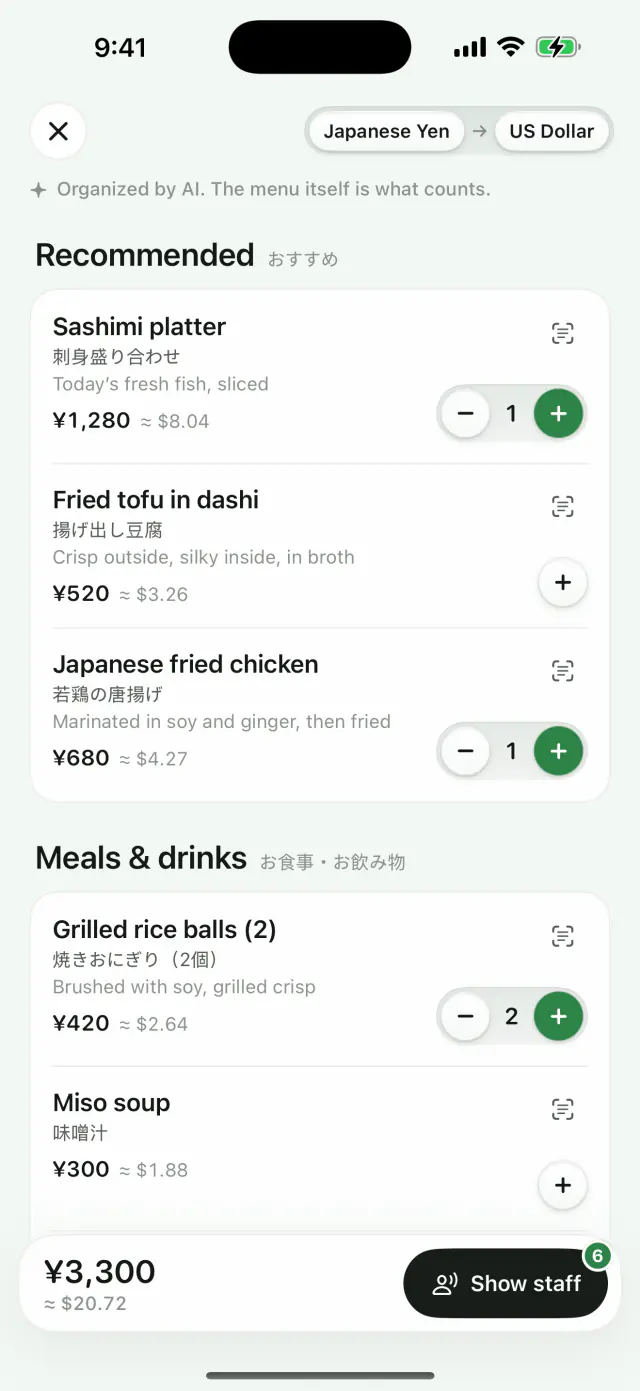
Order from any menu.
Eating abroad and can’t read the menu, even a handwritten or vertical one? Snap it or pick a photo, and Loupe turns it into a list you can order from.
- Every dish translated, with its original name and a short note
- Prices converted to your currency at a reference rate
- Pick quantities, then show the staff an order card in their language
Needs Loupe AI (included with Loupe Pro) or another AI model you connect; on-device translation can’t organize menus. The photo is sent only after you agree. Organized by AI; the menu itself is what counts.
More ways to translate.
Copy, select, split into words, translate a photo, or read it as subtitles.
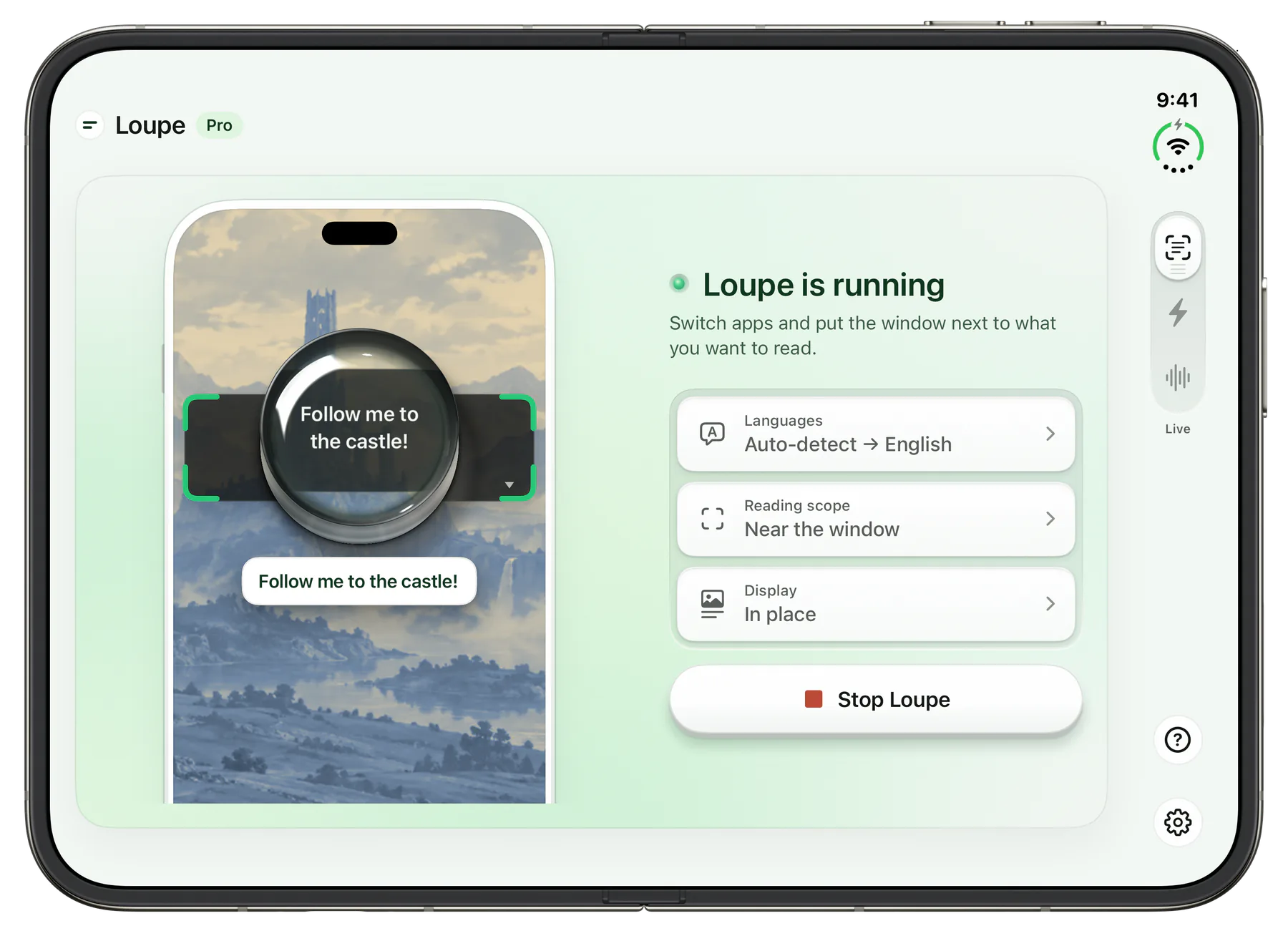
On iPad and iPhone Duo, too.
Each screen gets a layout made for it.
Side by side, translated next door
Turn on Stage Manager or windowed apps and put Loupe next to the app you’re reading. Its window mirrors the one beside it, with the text translated in place. When that app goes full screen, Loupe carries on in a Picture in Picture window.
Unfolded, laid out like a book
Unfold it and Loupe uses the fold as a spine: the demo on one side, the controls on the other. Next to Safari in Split View, the divider sits right on the fold, and translations appear in Picture in Picture as usual.
 嵯峨野庭園



Screen and sound stay on your device by default.
No account, no screenshots kept; recording is off by default and stays on your device. A service you connect gets only what it translates.
- Works offline
- Privacy Policy
A service you connect with your own key gets the text to translate (or the audio, for speech, and for AI Menu the menu photo you agree to send) straight from your device, never through our servers. Loupe AI is off until you agree to turn it on; then speech goes to a speech provider, and text (and AI Menu photos) is relayed through our server to a model provider.
Free every day. Pro when you need more.
Free
$0
No account needed
- Live and Voice5 min a day, combined
- Flash5 / day
- Web mode and Safari10 pages / day, combined
- Translate a selectionUnlimited
Loupe Pro
From $1.99
No daily limit
- Loupe AI built in, no key to set up
- No limits on time, Flash or web pages
- Subtitle mode, original alongside
- Connect more services, several at once
US pricing; varies by region. Subscriptions renew until canceled.
Questions
What does Loupe do?
Loupe translates what you see and hear on iPhone and iPad. Text in other apps is translated in place, speech in videos or around you becomes live captions, and in its own browser it translates web pages and whole comic pages.
Does it work with games, manga and webtoons?
Yes. Loupe reads the screen of whichever app is open, so games, visual novels, comic apps, social media and shopping apps all work. Apps that block screen recording may appear black. For comics on the web, open them in Loupe’s browser and whole pages are translated as you scroll.
Can I use Loupe in Safari?
Yes, with the Loupe extension turned on: a page can show the translation under each paragraph or on its own, and images on the page can be translated too. Captioned videos can show their subtitles in both languages. Free: 10 pages a day, shared with web mode; Pro has no limit.
Is my screen or sound uploaded? Does it work offline?
By default, nothing is uploaded: recognition and translation happen on your device, so it keeps working without a connection once the languages are downloaded. There are no accounts, ads or coins. A service you connect with your own key gets only the recognized text (audio for speech, in web mode a small circled area if you agree, and for AI Menu the menu photo you agree to send), straight from your device. Loupe AI, once you turn it on, relays text (and AI Menu photos) through our server.
Which languages are supported?
You can translate the languages supported by Apple’s on-device translation, including Japanese, Korean, Chinese, English, Spanish, French, German, Thai and Vietnamese. The app itself is available in 14 languages.
Is it free?
Yes, with no account. Live and Voice are free for 5 minutes a day, Flash for 5 times a day, and web mode and Safari for 10 pages a day combined. Loupe Pro removes the limits, as a monthly, yearly or one-time purchase.
What is live clipboard translation?
On iPhone, copy any text and its translation appears in the Dynamic Island, without leaving the app you’re in.
Can I use DeepL or my own translation service?
Yes, as an option. In Settings, go to Translation Engine, pick a service and paste your own key. It’s stored in the Keychain on your device and never sent to us; that service gets only recognized text (or audio, for a speech service), plus, in web mode, the small area you circle when it can’t be read on device and you agree, and for AI Menu, the menu photo you agree to send. On-device translation stays the default.
What is Loupe AI?
Loupe AI is online translation included in Loupe Pro, so you don’t need a key of your own. It works for speech captions and for text (screen, selection, web mode, Safari and AI Menu). It stays off until you turn it on in Settings › Translation Engine and agree to a short notice; then speech goes to a speech provider, and the text to translate (plus, in web mode, a small circled area your device can’t read, and AI Menu photos) goes through our server to a model provider. Each month, speech gets 2 hours with a subscription or 1 hour with Lifetime, and text about 10,000 screen translations or about 7,000. When one runs out, Loupe switches back to on-device translation or the service you used before until the next period; for speech you can also buy Add-On Time. Family Sharing members don’t get Loupe AI.